Color-coded
Whose day is it? You can tell at a glance.
Each person gets a color. Their events, chores and reminders wear it everywhere, so a busy Tuesday is obvious before you open it.
Every practice, appointment and pickup in one calendar your whole household shares, color-coded by person, on iPhone, iPad and Android.
7-day free trialOne plan per householdNo ads
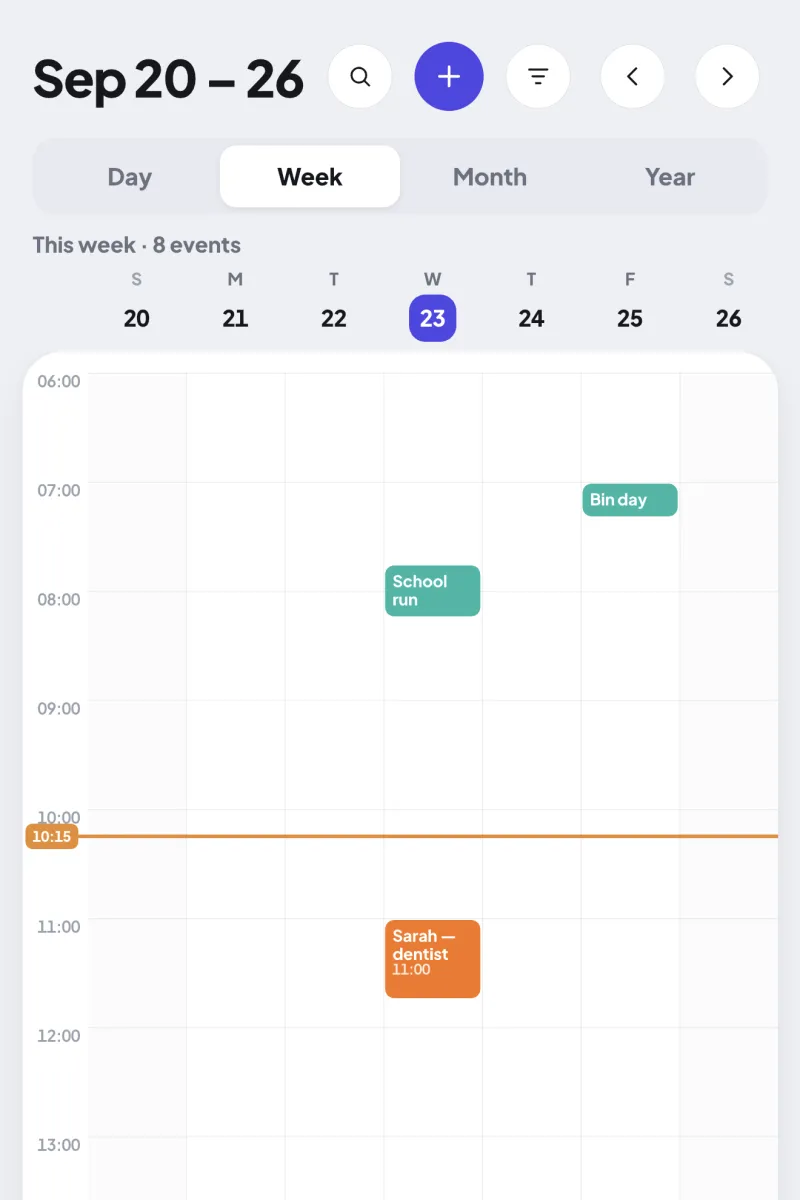
Each person gets a color. Their events, chores and reminders wear it everywhere, so a busy Tuesday is obvious before you open it.
Connect Google Calendar or the calendars on your iPhone, subscribe to a school, team or work calendar link, or import an .ics file. New dates show up on their own.
When two plans overlap for the same person, Ourfold flags the conflict, so nobody is double-booked at pickup time.
Weekly practice, monthly bills, the yearly checkup. Repeat any event and add reminders for whoever needs them.
Zoom from today’s pickups to the whole school year, and search any event by name.
Everyone opens the app to their own day: what’s next, what’s for dinner and what’s left to do.
Give everyone a color in a minute.
Connect Google Calendar or subscribe to the school calendar link.
Partners and teens get an invite link. Younger kids join with a PIN, no email needed.
Yes. Connect Google Calendar and its events show up in Ourfold in your color. Synced events stay read-only in Ourfold, so you edit them where they live. You can also subscribe to any calendar link or import an .ics file.
Yes. Ourfold runs on iPhone, iPad and Android, and everyone in the household sees the same calendar, whatever phone they carry.
Google Calendar shows events. Ourfold puts them next to the rest of family life: person colors, a Today for each person, and the chores, meals and lists that go with the schedule. Kids can join with a PIN instead of an email account.
No. A grown-up adds them, and they sign in with a PIN. No email, no password, nothing for them to lose.
One plan covers the whole household: $39.99 a year after a 7-day free trial, or $7.99 a month. Prices vary by country, and the App Store and Google Play show yours.
Start with a 7-day free trial.
